Ray/Cluster Channel
A channel commprised of the combination of discrete rays.
obj/channel/channel_ray_cluster.m
Superclass: Channel
On This Page
- About
- Video Tutorial
- Creating a Ray/Cluster Channel
- Key Properties
- Setting the AoD and AoA Ranges
- Setting the AoD and AoA Distribution
- Snapping the AoDs and AoAs
- Invoking a Channel Realization
- Viewing the Beamspace
- Shorthand Methods
- List of Properties
- List of Methods
- Methods Documentation
About
A ray/cluster channel is based on the Saleh-Valenzuela channel model, where the channel is comprised of the combination of a discrete set of rays. This is a common model for millimeter-wave channels, for example, which exhibit high reflectivity and low diffusion.
Mathematically, a ray/cluster channel matrix can be expressed as
where the channel is comprised of clusters, each having rays. The -th ray in the -th cluster exhibits some complex gain and has some angle of departure (from the transmit array) and angle of arrival (at the receive array) . The consequent transmit and receive array responses are then and , respectively.
The channel_ray_cluster object represents a ray/cluster channel model and is a subclass of the channel object.
Video Tutorial
Creating a Ray/Cluster Channel
To create a ray/cluster channel, simply use
c = channel.create('ray-cluster')
where c is a channel_ray_cluster object.
Key Properties
The channel_ray_cluster object is a subclass of the channel object and thus inherits all of its properties and methods.
The key properties it inherits are
c.array_transmit
c.array_receive
c.num_antennas_transmit
c.num_antennas_receive
c.carrier_frequency
c.carrier_wavelength
c.propagation_velocity
c.channel_matrix
In addition to these, it also contains the following properties.
The number of clusters and number of rays per cluster are stored in
c.num_clusters
c.num_rays_per_cluster
The AoDs and AoAs are stored in the 3-D arrays (tensors)
c.AoD
c.AoA
where the -th element of each corresponds to the azimuth AoD/AoA of the -th ray within the -th cluster, and the -th element of each corresponds to the elevation AoD/AoA of the -th ray within the -th cluster.
The gain of the rays are stored in
c.ray_gains
whose -th element is the complex gain of the -th ray within the -th cluster.
Setting the AoD and AoA Ranges
To set the range that AoDs and AoAs can take, use
c.set_AoD_range(az_min,az_max,el_min,el_max)
and
c.set_AoA_range(az_min,az_max,el_min,el_max)
where az_min and az_max are the minimum and maximum azimuth AoD/AoA (in radians) and el_min el_max are the minimum and maximum elevation AoD/AoA (in radians).
Setting the AoD and AoA Distribution
To generate the AoD and AoA of the -th ray within the -th cluster, MFM first draws a so-called cluster AoD and cluster AoA, which can be used when realizing the each of its rays’ AoD and AoA.
Cluster AoDs and cluster AoAs are drawn uniformly based on the AoD range and AoA range, respectively.
For example, the rays’ AoD and AoA can be set to be Laplacian distributed around their respective cluster AoD and AoA via
opt.type = 'laplacian'
opt.std_dev = std_dev
c.set_ray_angle_distribution(opt)
where std_dev is the desired standard deviation of the Laplacian distribution. In this way, the cluster AoD and cluster AoA act as the mean when drawing from the Laplacian distribution.
Similarly, the rays can be drawn from a Gaussian distribution via
opt.type = 'gaussian'
opt.variance = [var_az,var_el]
c.set_ray_angle_distribution(opt)
where var_az and var_el are the desired variances of the Gaussian distribution for the azimuth and elevation angles, respectively.
Azimuth and elevation are drawn independently in all cases.
Snapping the AoDs and AoAs
To force the realized AoDs and AoAs to exist on some grid, use
c.set_snap_AoD(AoD_grid)
c.set_snap_AoA(AoA_grid)
where the first row of AoD_grid and of AoA_grid are grids of azimuth AoDs and azimuth AoAs, respectively, and the second rows are grids of elevation AoDs and elevation AoAs.
Setting the Ray Gain Distribution
To set the ray gains to be drawn from a complex Gaussian distribution with mean 0 and variance 1, use
opt.type = 'cgauss'
c.set_ray_angle_distribution(opt)
To force the ray gains to all be equal to 1, use
opt.type = 'unit'
c.set_ray_angle_distribution(opt)
Example Setup
The typical setup of a ray/cluster channel is of the form
c = channel.create('ray-cluster');
c.set_propagation_velocity(vel);
c.set_carrier_frequency(fc);
c.set_array_transmit(atx);
c.set_array_receive(arx);
ray_gain_opt.type = 'cgauss';
c.set_ray_gain_distribution(ray_gain_opt);
ray_angle_opt.type = 'laplacian';
ray_angle_opt.std_dev = [0.2,0.2];
c.set_ray_angle_distribution(ray_angle_opt);
c.set_AoD_range(az_min_AoD,az_max_AoD,el_min_AoD,el_max_AoD);
c.set_AoA_range(az_min_AoA,az_max_AoA,el_min_AoA,el_max_AoA);
c.set_num_clusters_range(num_clusters_range);
c.set_num_rays_per_cluster_range(num_rays_per_cluster_range);
Invoking a Channel Realization
To invoke a realization of the channel, use
H = c.realization()
where H is the realized channel matrix.
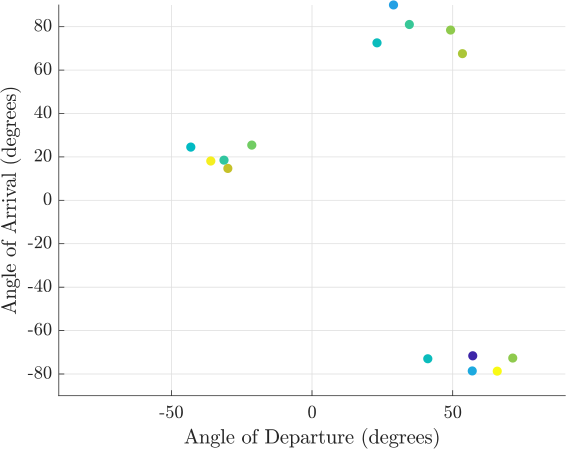
Viewing the Beamspace
To view the beamspace of the channel, use
c.show_beamspace_azimuth()
for the azimuth beamspace and
c.show_beamspace_elevation()
for the elevation beamspace.
List of Properties
The channel_ray_cluster object contains the following properties:
channel_ray_cluster.num_clusterschannel_ray_cluster.num_clusters_rangechannel_ray_cluster.num_rays_per_clusterchannel_ray_cluster.num_rays_per_cluster_rangechannel_ray_cluster.cluster_AoDchannel_ray_cluster.cluster_AoAchannel_ray_cluster.AoDchannel_ray_cluster.AoAchannel_ray_cluster.AoD_rangechannel_ray_cluster.AoA_rangechannel_ray_cluster.ray_angle_distributionchannel_ray_cluster.ray_gain_distributionchannel_ray_cluster.ray_gainschannel_ray_cluster.snap_AoAchannel_ray_cluster.snap_AoDchannel_ray_cluster.namechannel_ray_cluster.channel_matrixchannel_ray_cluster.num_antennas_transmitchannel_ray_cluster.num_antennas_receivechannel_ray_cluster.array_transmitchannel_ray_cluster.array_receivechannel_ray_cluster.carrier_frequencychannel_ray_cluster.carrier_wavelengthchannel_ray_cluster.propagation_velocitychannel_ray_cluster.normalized_channel_energychannel_ray_cluster.force_channel_energy_normalization
List of Methods
The channel_ray_cluster object contains the following methods:
channel_ray_cluster.HReturns the channel matrix.channel_ray_cluster.NrReturns the number of receive antennas out of the channel.channel_ray_cluster.NtReturns the number of transmit antennas into the channel.channel_ray_cluster.channel_ray_clusterCreates a MIMO channel object based on the ray/cluster model.channel_ray_cluster.check_AoD_AoA_rangeChecks a range matrix to ensure it is proper for setting the AoA and AoD ranges.channel_ray_cluster.createCreates a channel object of a specific type.channel_ray_cluster.enforce_channel_energy_normalizationNormalizes the channel matrix so that its total energy (squared Frobenius norm) is equal the current normalized channel energy property. The default normalized channel energy is the product of the number of transmit antenans and the number of receive antennas.channel_ray_cluster.generate_channel_matrixGenerates the channel matrix based on the associated random variables and the array response vectors of the transmit and receive arrays.channel_ray_cluster.generate_cluster_AoAGenerates the clusters’ angles of arrival.channel_ray_cluster.generate_cluster_AoDGenerates the clusters’ angles of departure.channel_ray_cluster.generate_num_clustersGenerates the number of clusters in the channel.channel_ray_cluster.generate_num_rays_per_clusterGenerates the number of rays per cluster in the channel.channel_ray_cluster.generate_ray_AoAGenerates the angles of arrival for each ray within each cluster of the channel.channel_ray_cluster.generate_ray_AoDGenerates the angles of departure for each ray with each cluster of the channel.channel_ray_cluster.generate_ray_gainsGenerates the complex gain of each ray in the channel (drawn from circularly symmetric Normal dist.).channel_ray_cluster.get_channel_matrixReturns the channel matrix.channel_ray_cluster.initializeInitializes a channel.channel_ray_cluster.initialize_ray_clusterInitializes a ray/cluster channel.channel_ray_cluster.realizationRealizes a random instance of the channel matrix based on the channel object’s parameters.channel_ray_cluster.set_AoA_rangeSets the range of possible angles of arrival (AoA) in radians.channel_ray_cluster.set_AoD_rangeSets the range of possible angles of departure (AoD) in radians.channel_ray_cluster.set_array_receiveSets the receive array object. Also sets the number of receive antennas accordingly.channel_ray_cluster.set_array_transmitSets the transmit array object. Also sets the number of transmit antennas accordingly.channel_ray_cluster.set_arraysSets the transmit and receive arrays at the input and output of the channel.channel_ray_cluster.set_carrier_frequencySets the carrier frequency of the channel.channel_ray_cluster.set_channel_matrixSets the channel matrix.channel_ray_cluster.set_force_channel_energy_normalizationSets the enforcement of channel energy normalization. If true, the channel matrix will always be normalized such that its energy is of the desired value.channel_ray_cluster.set_nameSets the name of the channel.channel_ray_cluster.set_normalized_channel_energySets the normalized energy of the channel.channel_ray_cluster.set_num_clusters_rangeSets the range of the number of clusters in the channel.channel_ray_cluster.set_num_rays_per_cluster_rangeSets the range of the number of rays per cluster in the channel.channel_ray_cluster.set_propagation_velocitySets the propagation velocity of the channel.channel_ray_cluster.set_ray_angle_distributionSets the distibution of the ray angles of departure and arrival.channel_ray_cluster.set_ray_gain_distributionSets the distibution of the ray gains.channel_ray_cluster.set_receive_arraySets the receive array object (LEGACY).channel_ray_cluster.set_snap_AoASets the “snap” angles of arrival (the values that the AoAs can take on).channel_ray_cluster.set_snap_AoDSets the “snap” angles of departure (the values that the AoDs can take on).channel_ray_cluster.set_transmit_arraySets the transmit array object (LEGACY).channel_ray_cluster.show_beamspace_azimuthPlots the ray gains in a scatter plot as a function of azimuth AoD and azimuth AoA.channel_ray_cluster.show_beamspace_elevationPlots the ray gains in a scatter plot as a function of elevation AoD and elevation AoA.channel_ray_cluster.snap_ray_AoD_AoASnaps the current rays’ AoDs and AoAs to the valid AoDs and AoAs (snap_AoD and snap_AoA).channel_ray_cluster.snap_to_discrete_setSnaps values to the closest element in a set.
Methods Documentation
H()
Returns the channel matrix.
- Usage:
val = H()- Return Values:
val— the channel matrix
Nr()
Returns the number of receive antennas out of the channel.
- Usage:
val = Nr()- Return Values:
val— the number of receive antennas out of the channel
Nt()
Returns the number of transmit antennas into the channel.
- Usage:
val = Nt()- Return Values:
val— the number of transmit antennas into the channel
channel_ray_cluster(name)
Creates a MIMO channel object based on the ray/cluster model.
- Usage:
obj = channel_ray_cluster()obj = channel_ray_cluster(name)- Input Arguments:
name— an optional name for the object- Return Values:
obj— an object representing a channel based on the ray/cluster model
check_AoD_AoA_range(rng)
Checks a range matrix to ensure it is proper for setting the AoA and AoD ranges.
- Usage:
check_AoD_AoA_range(rng)- Input Arguments:
rng— a 2-by-2 matrix where the first row is a vector of azimuth ranges (in radians) and the second row is a vector of elevation ranges (in radians)
create(type)
Creates a channel object of a specific type.
- Usage:
c = channel.create()c = channel.create(type)- Input Arguments:
type— (optional) a string specifying what type of channel to create- Return Values:
c— a channel object of the type specified
enforce_channel_energy_normalization(H)
Normalizes the channel matrix so that its total energy (squared Frobenius norm) is equal the current normalized channel energy property. The default normalized channel energy is the product of the number of transmit antenans and the number of receive antennas.
- Usage:
G = enforce_channel_energy_normalization()G = enforce_channel_energy_normalization(H)- Input Arguments:
H— (optional) a channel matrix; if not passed, the current channel matrix will be used and overwritten with the normalized version; if passed, the channel matrix property will not be set- Return Values:
G— the normalized channel matrix
generate_channel_matrix()
Generates the channel matrix based on the associated random variables and the array response vectors of the transmit and receive arrays.
- Usage:
generate_channel_matrix()
generate_cluster_AoA()
Generates the clusters’ angles of arrival.
- Usage:
generate_cluster_AoA()- Notes:
- obj.cluster_AoA is updated which are the mean angles for the rays coming from their respective clusters.
generate_cluster_AoD()
Generates the clusters’ angles of departure.
- Usage:
GENERATE_CLUSTER_AoD()- Notes:
- obj.cluster_AoD is updated which are the mean angles for the rays coming from their respective clusters.
generate_num_clusters()
Generates the number of clusters in the channel.
- Usage:
generate_num_clusters()- Notes:
- obj.num_clusters is updated with a realization of the number of clusters in the channel.
generate_num_rays_per_cluster()
Generates the number of rays per cluster in the channel.
- Usage:
generate_num_rays_per_cluster()- Notes:
- obj.num_rays_per_cluster is updated with a realization of the number of rays per cluster in the channel.
generate_ray_AoA()
Generates the angles of arrival for each ray within each cluster of the channel.
- Usage:
generate_ray_AoA()
generate_ray_AoD()
Generates the angles of departure for each ray with each cluster of the channel.
- Usage:
generate_ray_AoD()
generate_ray_gains()
Generates the complex gain of each ray in the channel (drawn from circularly symmetric Normal dist.).
- Usage:
generate_ray_gains()
get_channel_matrix()
Returns the channel matrix.
- Usage:
H = get_channel_matrix()- Return Values:
H— channel matrix
initialize()
Initializes a channel.
- Usage:
initialize()
initialize_ray_cluster()
Initializes a ray/cluster channel.
- Usage:
initialize_ray_cluster()
realization()
Realizes a random instance of the channel matrix based on the channel object’s parameters.
- Usage:
H = CHANNEL_realization()- Return Values:
H— the resulting channel matrix
set_AoA_range(az_min,az_max,el_min,el_max)
Sets the range of possible angles of arrival (AoA) in radians.
- Usage:
set_AoA_range(az_min)set_AoA_range(az_min,az_max,el_min,el_max)- Input Arguments:
az_min— minimum azimuth angle of arrival (radians); or a 2-by-2 matrix where the first row is a vector of azimuth ranges (in radians) and the second row is a vector of elevation ranges (in radians)az_max— (optional) maximum azimuth angle of arrival (radians); only optional if az_min is a 2-by-2 matrixel_min— (optional) minimum elevation angle of arrival (radians); only optional if az_min is a 2-by-2 matrixel_max— (optional) maximum elevation angle of arrival (radians); only optional if az_min is a 2-by-2 matrix
set_AoD_range(az_min,az_max,el_min,el_max)
Sets the range of possible angles of departure (AoD) in radians.
- Usage:
set_AoD_range(az_min)set_AoD_range(az_min,az_max,el_min,el_max)- Input Arguments:
az_min— minimum azimuth angle of departure (radians); or a 2-by-2 matrix where the first row is a vector of azimuth ranges (in radians) and the second row is a vector of elevation ranges (in radians)az_max— (optional) maximum azimuth angle of departure (radians); only optional if az_min is a 2-by-2 matrixel_min— (optional) minimum elevation angle of departure (radians); only optional if az_min is a 2-by-2 matrixel_max— (optional) maximum elevation angle of departure (radians); only optional if az_min is a 2-by-2 matrix
set_array_receive(array)
Sets the receive array object. Also sets the number of receive antennas accordingly.
- Usage:
set_array_receive(array)- Input Arguments:
array— an array object
set_array_transmit(array)
Sets the transmit array object. Also sets the number of transmit antennas accordingly.
- Usage:
set_array_transmit(array)- Input Arguments:
array— an array object
set_arrays(array_transmit,array_receive)
Sets the transmit and receive arrays at the input and output of the channel.
- Usage:
set_arrays(array_transmit,array_receive)- Input Arguments:
array_transmit— an array object at the channel inputarray_receive— an array object at the channel output
set_carrier_frequency(fc)
Sets the carrier frequency of the channel.
- Usage:
set_carrier_frequency(fc)- Input Arguments:
fc— carrier frequency (Hz)- Notes:
- Also updates carrier wavelength.
set_channel_matrix(H)
Sets the channel matrix.
- Usage:
set_channel_matrix(H)- Input Arguments:
H— channel matrix
set_force_channel_energy_normalization(force)
Sets the enforcement of channel energy normalization. If true, the channel matrix will always be normalized such that its energy is of the desired value.
- Usage:
set_force_channel_energy_normalization(force)- Input Arguments:
force— a boolean indicating if the channel matrix should be normalized or not
set_name(name)
Sets the name of the channel.
- Usage:
set_name()set_name(name)- Input Arguments:
name— (optional) a string; if not passed, ‘channel’ is the default name used
set_normalized_channel_energy(E)
Sets the normalized energy of the channel.
- Usage:
set_normalized_channel_energy()set_normalized_channel_energy(E)- Input Arguments:
E— (optional) the desired normalized channel energy; if not passed, the product of the number of transmit antennas and the number of receive antennas will be used
set_num_clusters_range(M,N)
Sets the range of the number of clusters in the channel.
- Usage:
set_num_clusters_range(M)set_num_clusters_range(M,N)- Input Arguments:
M— either the minimum number of clusters in the channel; or a 1-by-2 vector of integers representing the range of the number of clusters in the channelN— (optional) the maximum number of clusters in the channel- Notes:
- If M = a, the number of clusters in the channel is fixed and equal to a.
- If M = [a b] or M = [a; b], the number of clusters in the channel is drawn uniformly from the range [a,b] (inclusive) during each channel realization.
set_num_rays_per_cluster_range(M,N)
Sets the range of the number of rays per cluster in the channel.
- Usage:
set_num_rays_per_cluster_range(M)set_num_rays_per_cluster_range(M,N)- Input Arguments:
M— either the minimum number of rays per cluster in the channel; or a 1-by-2 vector of integers representing the range of the number of rays per cluster in the channelN— (optional) the maximum number of rays per cluster in the channel- Notes:
- If M = a, the number of rays per cluster is fixed and equal to a.
- If M = [a b] or M = [a; b], the number of rays per cluster is drawn uniformly from the range [a,b] (inclusive) during each channel realization.
set_propagation_velocity(val)
Sets the propagation velocity of the channel.
- Usage:
set_propagation_velocity(val)- Input Arguments:
val— propagation velocity (meters/sec)
set_ray_angle_distribution(opt)
Sets the distibution of the ray angles of departure and arrival.
- Usage:
set_ray_angle_distribution(opt)- Input Arguments:
opt— a struct specifying the distribution; opt.type should specify the distribution (e.g., ‘unit’ or ‘cgauss’); other optional distribution parameters (e.g., variance) could be specified in the struct, though not currently supported
set_ray_gain_distribution(opt)
Sets the distibution of the ray gains.
- Usage:
set_ray_gain_distribution(opt)- Input Arguments:
opt— a struct specifying the distribution; opt.type should specify the distribution (e.g., ‘unit’ or ‘cgauss’); other optional distribution parameters (e.g., variance) could be specified in the struct, though not currently supported
set_receive_array(array)
Sets the receive array object (LEGACY).
- Usage:
set_receive_array(array)- Input Arguments:
array— an array object
set_snap_AoA(AoA)
Sets the “snap” angles of arrival (the values that the AoAs can take on).
- Usage:
set_snap_AoA(AoA)- Input Arguments:
AoA— a vector of valid AoAs where the first row values are azimuth angles and the second row values are elevation angles (both in radians).
set_snap_AoD(AoD)
Sets the “snap” angles of departure (the values that the AoDs can take on).
- Usage:
set_snap_AoD(AoD)- Input Arguments:
AoD— a vector of valid AoDs where the first row values are azimuth angles and the second row values are elevation angles (both in radians).
set_transmit_array(array)
Sets the transmit array object (LEGACY).
- Usage:
set_transmit_array(array)- Input Arguments:
array— an array object
show_beamspace_azimuth()
Plots the ray gains in a scatter plot as a function of azimuth AoD and azimuth AoA.
- Usage:
show_beamspace_azimuth()
show_beamspace_elevation()
Plots the ray gains in a scatter plot as a function of elevation AoD and elevation AoA.
- Usage:
show_beamspace_elevation()
snap_ray_AoD_AoA()
Snaps the current rays’ AoDs and AoAs to the valid AoDs and AoAs (snap_AoD and snap_AoA).
- Usage:
snap_ray_AoD_AoA()
snap_to_discrete_set(val,set)
Snaps values to the closest element in a set.
- Usage:
t = snap_to_discrete_set(val,set)- Input Arguments:
val— a vector of valuesset— a vector of values that the each entry in val should be snapped to- Return Values:
t— a vector of values where each entry in val has been snapped to the closest element in set