Link
A physical connection between two devices.
obj/link/link.m
On This Page
- About
- Creating a Link
- Key Properties
- Symmetric Forward and Reverse Channels
- Symmetric Forward and Reverse Path Loss
- Setting the Forward and Reverse Channel Models
- Setting the Forward and Reverse Path Loss Models
- Forward and Reverse SNR
- Setting the Forward and Reverse SNR
- Shorthand Methods
- List of Properties
- List of Methods
- Methods Documentation
The link object is used to represent the physical connection (i.e., propagation) between one device object and another.
Propagation from one device to another is modeled by two components, as evidenced by common MIMO formulations:
- a channel matrix
- a large-scale gain
The link object uses a channel object—more likely, one of its subclasses—to handle generation of the channel matrix .
The link object uses a path_loss object—again, one of its subclasses—to handle generation of the large-scale gain .
In general, it may be the case that the channel and large-scale gain between two devices is not symmetric—or reciprocal—meaning that the link observered in one direction from the first device to the second is not necessarily the link observed from the second device to the first. This can be due to a variety of factors including separate arrays used for transmission and reception or separate bands for uplink and downlink, for example.
To capture this assymetry, the link object actually contains two links:
- a forward link
- a reverse link
To define these two links, we must also introduce the nomenclature for the two devices connected by a link:
- a “head” device
- a “tail” device
The head of the link is a device with transmit capability—either a transmitter or a transceiver. The tail of the link is a device with receive capability—either a receiver or transceiver.
If both devices only had transmit capability or only had receive capability, a physical link may exist but would be immaterial. This motivates our “head” and “tail” conventions.
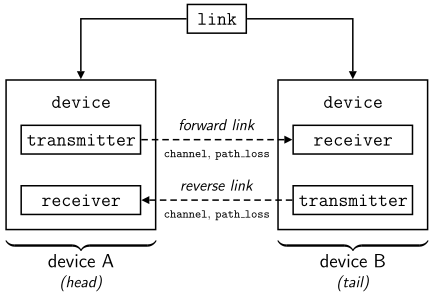
The forward link is defined as from the head to the tail and always has some practical meaning given the fact that the head can transmit and the tail can receive.
The reverse link is defined as from the tail to the head but only has a a practical meaning if both the head and the tail are transceivers.
Propagation between two devices is largely characterized by the carrier frequency of the signal propagating from one device to the other. In some cases, the link is “symmetric”—or “reciprocal”—where a signal going from one device to the other sees the same environment as if it had traveled in the reverse fashion. This is common for time-division duplex systems where transmission by two devices takes place on the same frequency resources (with sufficient stationarity) and thus experiences symmetric transmit and receive channels.
Creating a Link
A link object can be created in the follow fashion
lnk = link.create(head,tail)
where head is a device object with transmit capability and tail is a device object with receive capability.
Key Properties
A link object lnk contains the following important properties, among others.
The head and tail devices are captured by
lnk.head
lnk.tail
The channel object representing the channel model used on the forward link is
lnk.channel_forward
The channel object representing the channel model used on the reverse link is
lnk.channel_reverse
The actual channel matrices for the forward and reverse links, respectively, are stored in
lnk.channel_matrix_forward
lnk.channel_matrix_reverse
The path_loss object representing the path loss model used on the forward link is
lnk.path_loss_forward
The path_loss object representing the path loss model used on the reverse link is
lnk.path_loss_reverse
The large-scale gain on the forward link—which is a product of lnk.path_loss_forward—is
lnk.large_scale_gain_foward
and likewise the large-scale gain on the reverse link is
lnk.large_scale_gain_reverse
The distance of the link in meters—the separation of the head and tail devices—is critical to most path loss models and is stored in
lnk.distance
and is automatically calculated based on the locations of the head and tail devices.
Symmetric Forward and Reverse Channels
Sometimes it is the case that the forward and reverse channels should be symmetric, meaning reverse channel matrix is equal to the Hermitian of the forward channel matrix.
To achieve this, simply use
lnk.set_channel_symmetric(true)
which will be reflected in the property
lnk.channel_symmetric
Note that this is only possible when the transmit and receive arrays at the head are equal in size and likewise at the tail (and the head and tail are both transceivers). This is often the case in practical transceivers since the same antennas are used for transmission and reception.
This will ensure that lnk.channel_matrix_forward is always the Hermitian of lnk.channel_matrix_reverse.
Symmetric Forward and Reverse Path Loss
Sometimes it is the case that the forward and reverse path losses should be symmetric, meaning reverse path loss (and thus the reverse large-scale gain) is equal to that of the forward link.
To achieve this, simply use
lnk.set_path_loss_symmetric(true)
which will be reflected in the property
lnk.path_loss_symmetric
This will ensure that lnk.large_scale_gain_forward is always equal to lnk.large_scale_gain_reverse.
Setting the Forward and Reverse Channel Models
To set the channel model used on the forward and reverse links of a link object lnk, use
lnk.set_channel(chan_fwd,chan_rev)
where chan_fwd and chan_rev are channel objects to use on the forward and reverse links, respectively. Note that chan_fwd and chan_rev can be different channel models if desired.
To set the forward and reverse links to use the same channel model—but not necessarily the same realizations—a simpler method is
lnk.set_channel(chan)
where chan is of course a channel object.
Note that, in all cases, the channel objects that are passed to the link are deep copied before using them, meaning the same chan, chan_fwd, and chan_rev can be used when setting multiple links if desired.
Also, note that the transmit and receive arrays of the head and tail devices are automatically used to set up the forward and reverse channel objects.
Setting the Forward and Reverse Path Loss Models
To set the path loss model used on the forward and reverse links of a link object lnk, use
lnk.set_channel(path_fwd,path_rev)
where path_fwd and path_rev are path_loss objects to use on the forward and reverse links, respectively. Note that path_fwd and path_rev can be different path loss models if desired.
To set the forward and reverse links to use the same path loss model—but not necessarily the same realizations—a simpler method is
lnk.set_path_loss(path)
where path is of course a path_loss object.
Note that, in all cases, the path_loss objects that are passed to the link are deep copied before using them, meaning the same path, path_fwd, and path_rev can be used when setting multiple links if desired.
Forward and Reverse SNR
A link object lnk also has properties
lnk.snr_forward
lnk.snr_reverse
which are “large-scale” signal-to-noise ratios (SNRs) defined as
where and are the transmit energy per symbol at the head and tail devices, respectively; and are the forward and reverse large-scale gains, respectively; and and are the noise energy per symbol at the receiver of the head and tail devices, respectively.
Note that the reverse link SNR is only applicable when the head and tail devices are both transceivers.
Setting the Forward and Reverse SNR
It is common in MIMO research to evaluate performance for various large-scale SNR values.
Rather than force the user to find a triplet of transmit power, distance/path loss, and noise power to achieve a desired SNR, the user can force the SNR on a link to be a desired value using
lnk.set_snr(snr_fwd,snr_rev,unit)
where snr_fwd and snr_rev are large-scale SNR values and unit is an optional string to specify the units of snr_fwd and snr_rev. If snr_rev = [], then snr_fwd will be set on the forward and reverse links.
For example, to set the large-scale SNR to 10 dB on the forward and reverse links, one would use
lnk.set_snr(10,[],'dB')
The set_snr function adjusts the large-scale gain to be achieve a desired based on the transmit energy per symbol and noise energy per symbol. Thus, to use this method, it is essential that the transmit energy per symbol and noise energy per symbol be set as desired and that the path loss not overwrite the newly set large-scale gain.
List of Properties
The link object contains the following properties:
link.namelink.headlink.taillink.channel_symmetriclink.channel_forwardlink.channel_reverselink.channel_matrix_forwardlink.channel_matrix_reverselink.large_scale_gain_forwardlink.large_scale_gain_reverselink.path_loss_forwardlink.path_loss_reverselink.path_loss_symmetriclink.snr_forwardlink.snr_reverselink.distancelink.line_stylelink.color
List of Methods
The link object contains the following methods:
link.compute_channel_state_informationConstrcuts a struct containing channel state information for the forward and reverse links.link.compute_channel_state_information_forwardConstrcuts a struct containing channel state information for the forward link.link.compute_channel_state_information_reverseConstrcuts a struct containing channel state information for the reverse link.link.compute_covariance_forwardComputes the covariance of the received symbols at the tail device from the head device. Also returns the covariance of received noise.link.compute_covariance_reverseComputes the covariance of the received symbols at the head device from the tail device. Also returns the covariance of received noise.link.compute_link_budgetReturns a struct of values used for a link budget, in log-scale (e.g., dB, dBm), of the forward link and reverse link.link.compute_link_budget_forwardReturns a struct of values used for a link budget, in log-scale (e.g., dB, dBm), of the forward link.link.compute_link_budget_reverseReturns a struct of values used for a link budget, in log-scale (e.g., dB, dBm), of the reverse link.link.compute_received_signalComputes the received signal on the forward link and reverse link.link.compute_received_signal_forwardComputes the received signal at the tail device from the head device.link.compute_received_signal_reverseComputes the received signal at the head device from the tail device.link.configure_receiverConfigures each device’s receiver according to the current/specified receive strategy, incorporating channel state information as applicable.link.configure_transmitterConfigures each device’s transmitter according to the current/specified transmit strategy, incorporating channel state information as applicable.link.createCreates a link between two devices: a head device (which has transmit capability) and a tail device (which has receive capability).link.initializeExecutes intialization steps to set up a link.link.isbidirectionalReturns a boolean indicating if the link is bidirectional (i.e., if the head device has receive capability and the tail device has transmit capability).link.linkCreates an instance of a link object.link.realizationInvokes a complete realization of the link.link.realization_channelInvokes a channel realization on the forward and reverse links.link.realization_channel_forwardInvokes a realization of the forward channel and sets the forward channel matrix.link.realization_channel_reverseInvokes a realization of the reverse channel and sets the reverse channel matrix. If the channel is set to symmetric, the reverse channel will be set to the conjugate transpose of the current forward channel matrix instead of invoking a realization of the reverse channel. Therefore, a forward channel realization should be invoked before a reverse channel realization if the channel is symmetric.link.realization_path_lossInvokes a realization fo the forward and reverse path loss.link.realization_path_loss_forwardInvokes a realization of the path loss model on the forward link.link.realization_path_loss_reverseInvokes a realization of the path loss model on the reverse link. If the link is set to have symmetric path loss, the current forward path loss is used.link.report_mutual_information_forwardReports the Gaussian mutual information achieved between the head and tail devices based on the current link realization and transmit-receive configurations. Returns the mutual information in bps/Hz. Discards any residual imaginary component.link.report_mutual_information_reverseReports the Gaussian mutual information achieved between the tail and head devices based on the current link realization and transmit-receive configurations. Returns the mutual information in bps/Hz. Discards any residual imaginary component.link.report_symbol_estimation_error_forwardReturns the squared-error in the estimated receive symbol at the tail compared to the transmit symbol at the head.link.report_symbol_estimation_error_reverseReturns the squared-error in the estimated receive symbol at the head compared to the transmit symbol at the tail.link.set_arraysSets the transmit and receive arrays at the head and tail devices.link.set_carrier_frequencySets the carrier frequency of the link. Also sets the carrier frequency of the head and tail devices.link.set_channelSets the channel used on the forward and reverse channels.link.set_channel_forwardSets the channel used on the forward link.link.set_channel_matricesSets the forward and reverse channel matrices.link.set_channel_matrix_forwardSets the channel matrix of the forward link.link.set_channel_matrix_reverseSets the channel matrix of the reverse link.link.set_channel_reverseSets the channel used on the reverse link.link.set_channel_symmetricSets the symmetry of the forward and reverse channels. Note that this is only possible if the transmit array and receive array at the head are equal in size and likewise at the tail.link.set_colorSets the color used when plotting the link.link.set_distanceSets the distance of the link (in meters).link.set_duplexingSets the duplexing method at the head and tail devices.link.set_headSets the head device of the link.link.set_large_scale_gainSets the large-scale gain of the forward and reverse links to the same value.link.set_large_scale_gain_forwardSets the large-scale gain of the forward link.link.set_large_scale_gain_reverseSets the large-scale gain of the reverse link.link.set_line_styleSets the line style used when plotting the link.link.set_markerSets the marker used by the head and tail devices.link.set_nameSets the name of the link.link.set_noise_power_per_HzSets the noise power per Hz at the receiver of the head and tail devices.link.set_num_rf_chainsSets the number of transmit and receive RF chains at the head and tail devices.link.set_num_streamsSets the number of streams at the head and tail devices.link.set_path_lossSets the path loss model used on the link.link.set_path_loss_forwardSets the path loss model used on the forward link.link.set_path_loss_reverseSets the path loss model used on the reverse link.link.set_path_loss_symmetricSets the symmetry of the forward and reverse path loss.link.set_propagation_velocitySets the propagation velocity of the link. Also sets the propagation velocity of the head and tail devices.link.set_receive_strategySets the receive strategy to use at the head and tail devices.link.set_snrSets the SNR of the forward and reverse links.link.set_snr_forwardSets the SNR of the forward link.link.set_snr_reverseSets the SNR of the reverse link.link.set_symbol_bandwidthSets the symbol bandwidth at the head and tail devices.link.set_tailSets the tail device of the link.link.set_transmit_powerSets the transmit power at the transmitter of the head and tail devices.link.set_transmit_strategySets the transmit strategy to use at the head and tail devices.link.set_transmit_symbolSets the transmit symbol at the head and tail devices.link.set_transmit_symbol_covarianceSets the transmit covariance of the device.link.show_2dDisplays the link in 2-D.link.show_3dDisplays the link in 3-D.
compute_channel_state_information()
Constrcuts a struct containing channel state information for the forward and reverse links.
- Usage:
[csi_forward,csi_reverse] = compute_channel_state_information()- Return Values:
csi_forward— a struct containing CSI values for the forward linkcsi_reverse— a struct containing CSI values for the reverse link
compute_channel_state_information_forward()
Constrcuts a struct containing channel state information for the forward link.
- Usage:
csi = compute_channel_state_information_forward()- Return Values:
csi— a struct containing CSI values
compute_channel_state_information_reverse()
Constrcuts a struct containing channel state information for the reverse link.
- Usage:
csi = compute_channel_state_information_reverse()- Return Values:
csi— a struct containing CSI values
compute_covariance_forward()
Computes the covariance of the received symbols at the tail device from the head device. Also returns the covariance of received noise.
- Usage:
[Ry,Rn] = compute_covariance_forward()- Return Values:
Ry— the received desired symbols covarianceRn— the received noise covariance
compute_covariance_reverse()
Computes the covariance of the received symbols at the head device from the tail device. Also returns the covariance of received noise.
- Usage:
[Ry,Rn] = compute_covariance_reverse()- Return Values:
Ry— the received desired symbols covarianceRn— the received noise covariance
compute_link_budget()
Returns a struct of values used for a link budget, in log-scale (e.g., dB, dBm), of the forward link and reverse link.
- Usage:
[budget_fwd, budget_rev] = GET_LINK_BUDGET()- Return Values:
budget_fwd— a struct containing link budget quantities in log-scale for the forward linkbudget_rev— a struct containing link budget quantities in log-scale for the forward link
compute_link_budget_forward()
Returns a struct of values used for a link budget, in log-scale (e.g., dB, dBm), of the forward link.
- Usage:
budget = GET_LINK_BUDGET_FORWARD()- Return Values:
budget— a struct containing link budget quantities in log-scale
compute_link_budget_reverse()
Returns a struct of values used for a link budget, in log-scale (e.g., dB, dBm), of the reverse link.
- Usage:
budget = compute_link_budget_reverse()- Return Values:
budget— a struct containing link budget quantities in log-scale
compute_received_signal()
Computes the received signal on the forward link and reverse link.
- Usage:
compute_received_signal()
compute_received_signal_forward()
Computes the received signal at the tail device from the head device.
- Usage:
[z,y,n] = compute_received_signal_forward()- Return Values:
z— the desired signal plus noisey— the desired signal vectorn— the noise vector
compute_received_signal_reverse()
Computes the received signal at the head device from the tail device.
- Usage:
[z,y,n] = compute_received_signal_reverse()- Return Values:
z— the desired signal plus noisey— the desired signal vectorn— the noise vector
configure_receiver(strategy)
Configures each device’s receiver according to the current/specified receive strategy, incorporating channel state information as applicable.
- Usage:
configure_receiver()configure_receiver(strategy)- Input Arguments:
strategy— (optional) receive strategy to use; if not passed, each device’s current receive strategy will be used
configure_transmitter(strategy)
Configures each device’s transmitter according to the current/specified transmit strategy, incorporating channel state information as applicable.
- Usage:
configure_transmitter()configure_transmitter(strategy)- Input Arguments:
strategy— (optional) transmit strategy to use; if not passed, each device’s current transmit strategy will be used
create(head,tail)
Creates a link between two devices: a head device (which has transmit capability) and a tail device (which has receive capability).
- Usage:
obj = link.create(head,tail)- Input Arguments:
head— a device with transmit capabilitytail— a device with receive capability- Return Values:
obj— a link object
initialize()
Executes intialization steps to set up a link.
- Usage:
initialize()
isbidirectional()
Returns a boolean indicating if the link is bidirectional (i.e., if the head device has receive capability and the tail device has transmit capability).
- Usage:
out = isbidirectional()- Return Values:
out— a boolean indicating if the link is bidirectional
link(head,tail)
Creates an instance of a link object.
- Usage:
obj = link(head,tail)- Input Arguments:
head— a device object at the head of the link; device must be a transmitter or transceivertail— a device object at the tail of the link; device must be a receiver or transceiver- Return Values:
obj— a link object
realization()
Invokes a complete realization of the link.
- Usage:
realization()- Notes:
- Invokes realizations of the foward and reverse path loss and forward and reverse channels.
realization_channel()
Invokes a channel realization on the forward and reverse links.
- Usage:
[H_fwd,H_rev] = realization_channel()- Return Values:
H_fwd— the forward channel matrix realizationH_rev— the reverse channel matrix realization
realization_channel_forward()
Invokes a realization of the forward channel and sets the forward channel matrix.
- Usage:
H = realization_channel_forward()- Return Values:
H— a channel matrix for the forward channel
realization_channel_reverse()
Invokes a realization of the reverse channel and sets the reverse channel matrix. If the channel is set to symmetric, the reverse channel will be set to the conjugate transpose of the current forward channel matrix instead of invoking a realization of the reverse channel. Therefore, a forward channel realization should be invoked before a reverse channel realization if the channel is symmetric.
- Usage:
H = realization_channel_reverse()- Return Values:
H— a channel matrix for the reverse channel
realization_path_loss()
Invokes a realization fo the forward and reverse path loss.
- Usage:
[G_forward,G_reverse] = realization_path_loss()- Return Values:
G_forward— the resulting forward large-scale gainG_reverse— the resulting reverse large-scale gain
realization_path_loss_forward()
Invokes a realization of the path loss model on the forward link.
- Usage:
G = realization_path_loss_forward()- Return Values:
G— the large-scale gain following the forward path loss realization
realization_path_loss_reverse()
Invokes a realization of the path loss model on the reverse link. If the link is set to have symmetric path loss, the current forward path loss is used.
- Usage:
G = realization_path_loss_reverse()- Return Values:
G— the large-scale gain following the reverse path loss realization
report_mutual_information_forward()
Reports the Gaussian mutual information achieved between the head and tail devices based on the current link realization and transmit-receive configurations. Returns the mutual information in bps/Hz. Discards any residual imaginary component.
- Usage:
mi = report_mutual_information_forward()- Return Values:
mi— the mutual information in bps/Hz- Notes:
- Will warn the user if a significant imaginary portion exists when computing the mutual information. Ultimately discards it though.
report_mutual_information_reverse()
Reports the Gaussian mutual information achieved between the tail and head devices based on the current link realization and transmit-receive configurations. Returns the mutual information in bps/Hz. Discards any residual imaginary component.
- Usage:
mi = report_mutual_information_reverse()- Return Values:
mi— the mutual information in bps/Hz- Notes:
- Will warn the user if a significant imaginary portion exists when computing the mutual information. Ultimately discards it though.
report_symbol_estimation_error_forward()
Returns the squared-error in the estimated receive symbol at the tail compared to the transmit symbol at the head.
- Usage:
[mse,mse_dB] = report_symbol_estimation_error_forward()- Return Values:
err— the squared error of the received symbols versus the transmitted symbolsnerr— err normalized to the transmit symbol power
report_symbol_estimation_error_reverse()
Returns the squared-error in the estimated receive symbol at the head compared to the transmit symbol at the tail.
- Usage:
[mse,mse_dB] = report_symbol_estimation_error_reverse()- Return Values:
err— the squared error of the received symbols versus the transmitted symbolsnerr— err normalized to the transmit symbol power
set_arrays(transmit_array,receive_array)
Sets the transmit and receive arrays at the head and tail devices.
- Usage:
set_arrays(transmit_array,receive_array)- Input Arguments:
transmit_array— array object to use at the transmitter of the head and tail devicesreceive_array— array object to use at the receiver of the head and tail devices
set_carrier_frequency(fc)
Sets the carrier frequency of the link. Also sets the carrier frequency of the head and tail devices.
- Usage:
set_carrier_frequency(fc)- Input Arguments:
fc— carrier frequency (Hz)- Notes:
- Also updates carrier wavelength.
set_channel(channel_forward,channel_reverse)
Sets the channel used on the forward and reverse channels.
- Usage:
set_channel(channel_forward)set_channel(channel_forward,channel_reverse)- Input Arguments:
channel_forward— a channel object used on the forward linkchannel_reverse— (optional) a channel object used on the reverse link; if not provided, the reverse channel will use the same channel object as the forward channel (i.e., channel_reverse = channel_forward)
set_channel_forward(channel)
Sets the channel used on the forward link.
- Usage:
set_channel_forward(channel)- Input Arguments:
channel— a channel object
set_channel_matrices(H_forward,H_forward)
Sets the forward and reverse channel matrices.
- Usage:
set_channel_matrices()set_channel_matrices(H_forward)set_channel_matrices(H_forward,H_reverse)- Input Arguments:
H_forward— (optional) forward channel matrixH_forward— (optional) reverse channel matrix
set_channel_matrix_forward(H)
Sets the channel matrix of the forward link.
- Usage:
set_channel_matrix_forward()set_channel_matrix_forward(H)- Input Arguments:
H— (optional) a channel matrix; if not passed, the forward channel’s channel matrix will be used
set_channel_matrix_reverse(H)
Sets the channel matrix of the reverse link.
- Usage:
set_channel_matrix_reverse()set_channel_matrix_reverse(H)- Input Arguments:
H— (optional) a channel matrix; if not passed, the reverse channel’s channel matrix will be used (if not symmetric); else the forward channel’s channel matrix will be used
set_channel_reverse(channel)
Sets the channel used on the reverse link.
- Usage:
set_channel_reverse(channel)- Input Arguments:
channel— a channel object
set_channel_symmetric(symmetric)
Sets the symmetry of the forward and reverse channels. Note that this is only possible if the transmit array and receive array at the head are equal in size and likewise at the tail.
- Usage:
set_channel_symmetric(symmetric)- Input Arguments:
symmetric— a boolean indicating if the forward and reverse channels are symmetric; if so, then the reverse channel matrix is the conjugate-transpose of the the forward channel matrix
set_color(color)
Sets the color used when plotting the link.
- Usage:
set_color(color)- Input Arguments:
color— an RGB triplet normalized to [0,1] or a MATLAB color code (e.g., ‘k’,’b’,’r’).
set_distance(d)
Sets the distance of the link (in meters).
- Usage:
set_distance()set_distance(d)- Input Arguments:
d— (optional) distance of the link (in meters); if not passed, the head and tail devices’ coordinates will be used to calculate the distance of the link
set_duplexing(duplex)
Sets the duplexing method at the head and tail devices.
- Usage:
set_duplexing(duplex)- Input Arguments:
duplex— a string specifying the duplexing method to use
set_head(head)
Sets the head device of the link.
- Usage:
set_head(head)- Input Arguments:
head— a device of type ‘transmitter’ or ‘transceiver’
set_large_scale_gain(G_forward,G_reverse)
Sets the large-scale gain of the forward and reverse links to the same value.
- Usage:
set_large_scale_gain(G_forward)set_large_scale_gain(G_forward,G_reverse)- Input Arguments:
G_forward— large-scale gain of the forward linkG_reverse— (optional) large-scale gain of the reverse link; if not passed, G_forward will be used as G_reverse
set_large_scale_gain_forward(G)
Sets the large-scale gain of the forward link.
- Usage:
set_large_scale_gain_forward(G)- Input Arguments:
G— large-scale amplitude gain (G^2 is power gain)
set_large_scale_gain_reverse(G)
Sets the large-scale gain of the reverse link.
- Usage:
set_large_scale_gain_reverse(G)- Input Arguments:
G— large-scale amplitude gain (G^2 is power gain)
set_line_style(line_style,(dashed), ')
Sets the line style used when plotting the link.
- Usage:
set_line_style(line_style)- Input Arguments:
line_style— a MATLAB line style; either ‘-‘ (solid), ‘–’(dashed), '— ‘ (dotted), or ‘-.’ (dash-dotted)
set_marker(marker_head,marker_tail)
Sets the marker used by the head and tail devices.
- Usage:
set_marker(marker_head)set_marker(marker_head,marker_tail)- Input Arguments:
marker_head— a marker to use at the head devicemarker_tail— (optional) a marker to use at the tail device; if not passed, the marker specified for the head will be used
set_name(name)
Sets the name of the link.
- Usage:
set_name()set_name(name)- Input Arguments:
name— (optional) a string; if not passed, a name is created
set_noise_power_per_Hz(noise_psd,unit)
Sets the noise power per Hz at the receiver of the head and tail devices.
- Usage:
set_noise_power_per_Hz(noise_psd)set_noise_power_per_Hz(noise_psd,unit)- Input Arguments:
noise_psd— the noise power spectral densityunit— (optional) a string specifying the units of noise_psd (e.g., ‘dBm_Hz’ or ‘watts_Hz’); if not passed, the default will be used- Notes:
- Also updates the SNR of the link.
set_num_rf_chains(Lt,Lr)
Sets the number of transmit and receive RF chains at the head and tail devices.
- Usage:
set_num_rf_chains(Lt,Lr)- Input Arguments:
Lt— number of transmit RF chains at the head and tail devicesLr— number of receive RF chains at the head and tail devices
set_num_streams(num_streams)
Sets the number of streams at the head and tail devices.
- Usage:
set_num_streams(num_streams)- Input Arguments:
num_streams— number of streams to multiplex at the transmitter and receiver of the head and tail devices
set_path_loss(path_loss_forward,path_loss_reverse)
Sets the path loss model used on the link.
- Usage:
set_path_loss(path_loss_forward)set_path_loss(path_loss_forward,path_loss_reverse)- Input Arguments:
path_loss_forward— a path loss object used on the forward linkpath_loss_reverse— (optional) a path loss object used on the reverse link; if not provided, the reverse path loss will use the same path loss object as the forward one (i.e., path_loss_reverse = path_loss_forward)
set_path_loss_forward(path_loss)
Sets the path loss model used on the forward link.
- Usage:
set_path_loss_forward(path_loss)set_path_loss_forward(path_loss,copy)- Input Arguments:
path_loss— a path loss object
set_path_loss_reverse(path_loss)
Sets the path loss model used on the reverse link.
- Usage:
set_path_loss_reverse(path_loss)- Input Arguments:
path_loss— a path loss object
set_path_loss_symmetric(symmetric)
Sets the symmetry of the forward and reverse path loss.
- Usage:
set_path_loss_symmetric(symmetric)- Input Arguments:
symmetric— a boolean indicating if the forward and reverse path loss are symmetric; if so, then the reverse large-scale gain will always be equal to the forward large-scale gain
set_propagation_velocity(vel)
Sets the propagation velocity of the link. Also sets the propagation velocity of the head and tail devices.
- Usage:
set_propagation_velocity(vel)- Input Arguments:
vel— propagation velocity (meters/sec)
set_receive_strategy(strategy)
Sets the receive strategy to use at the head and tail devices.
- Usage:
set_receive_strategy(strategy)- Input Arguments:
strategy— a string specifying the receive strategy
set_snr(snr_forward,snr_reverse)
Sets the SNR of the forward and reverse links.
- Usage:
set_snr()set_snr(snr_forward,snr_reverse)set_snr(snr_forward,snr_reverse,unit)- Input Arguments:
snr_forward— (optional) the large-scale SNR of the forward linksnr_reverse— (optional) the large-scale SNR of the reverse link; if not passed, the SNR of the forward link is used
set_snr_forward(snr,unit)
Sets the SNR of the forward link.
- Usage:
set_snr_forward()set_snr_forward(snr)set_snr_forward(snr,unit)- Input Arguments:
snr— (optional) the large-scale SNR of the forward link; if passed, the large-scale gain of the forward link is adjusted accordingly; if not passed, the SNR is computed based on the current large-scale gainunit— (optional) a string specifying the unit of snr
set_snr_reverse(snr,unit)
Sets the SNR of the reverse link.
- Usage:
set_snr_reverse()set_snr_reverse(snr)set_snr_reverse(snr,unit)- Input Arguments:
snr— (optional) the large-scale SNR of the reverse link; if passed, the large-scale gain of the reverse link is adjusted accordingly; if not passed, the SNR is computed based on the current large-scale gainunit— (optional) a string specifying the unit of snr
set_symbol_bandwidth(B)
Sets the symbol bandwidth at the head and tail devices.
- Usage:
set_symbol_bandwidth(B)- Input Arguments:
B— the symbol bandwidth (in Hertz) at the transmitter and receiver of the head and tail devices- Notes:
- Also updates the SNR of the link.
set_tail(head)
Sets the tail device of the link.
- Usage:
set_tail(tail)- Input Arguments:
head— a device of type ‘receiver’ or ‘transceiver’
set_transmit_power(P,unit)
Sets the transmit power at the transmitter of the head and tail devices.
- Usage:
set_transmit_power(P)set_transmit_power(P,unit)- Input Arguments:
P— transmit power (e.g., in watts or dBm)unit— (optional) a string specifying the units of P (e.g., ‘dBm’); if not passed, the default is used.- Notes:
- Also updates the SNR of the link.
set_transmit_strategy(strategy)
Sets the transmit strategy to use at the head and tail devices.
- Usage:
set_transmit_strategy(strategy)- Input Arguments:
strategy— a string specifying the transmit strategy
set_transmit_symbol(s)
Sets the transmit symbol at the head and tail devices.
- Usage:
set_transmit_symbol(s)- Input Arguments:
s— transmit symbol vector
set_transmit_symbol_covariance(Rs)
Sets the transmit covariance of the device.
- Usage:
set_transmit_symbol_covariance(Rs)- Input Arguments:
Rs— a covariance matrix
show_2d(fignum)
Displays the link in 2-D.
- Usage:
show_2d()show_2d(fignum)- Input Arguments:
fignum— (optional) a figure number; if not passed, a new figure will be created- Return Values:
fig— the resulting a figure handle
show_3d(fignum)
Displays the link in 3-D.
- Usage:
show_3d()show_3d(fignum)- Input Arguments:
fignum— (optional) a figure number; if not passed, a new figure will be created- Return Values:
fig— the resulting a figure handle